Agora Chat 1.4.0 iOS
Agora Chat 1.4.0 iOS
1. 发送和接收 GIF 图片消息
发送 GIF 图片消息
- 自 iOS SDK 1.4.0 开始,支持发送 GIF 图片消息。
- GIF 图片消息是一种特殊的图片消息,与普通图片消息不同,GIF 图片发送时不能压缩。
- 图片缩略图的生成与普通图片消息相同,详见 发送图片消息。
发送 GIF 图片消息的过程如下:
- 构造
AgoraChatImageMessageBody后,设置isGif为true。 - 使用
AgoraChatImageMessageBody#initWithGifFilePath:displayName方法构造图片消息体。 - 调用
AgoraChatManager#sendMessage方法发送消息。
//使用 AgoraChatImageMessageBody
// imageData 为图片本地资源,displayName 为附件的显示名称。
AgoraChatImageMessageBody *body = [[AgoraChatImageMessageBody alloc] initWithData:imageData displayName:displayName];
body.isGif = YES;

// 使用 initWithGifFilePath:displayName
AgoraChatImageMessageBody *body = [[AgoraChatImageMessageBody alloc] initWithGifFilePath:@"localGifFilePath" displayName:displayName];

AgoraChatMessage *message = [[AgoraChatMessage alloc] initWithConversationID:toChatUsername from:fromChatUsername to:toChatUsername body:body ext:messageExt];

// 发送消息。
[[AgoraChatClient sharedClient].chatManager sendMessage:message progress:nil completion:nil];
接收 GIF 图片消息
自 iOS SDK 1.4.0 开始,支持接收 GIF 图片消息。
图片缩略图的下载与普通图片消息相同,详见 接收图片消息。
与普通消息相同,接收 GIF 图片消息时,接收方会收到 messagesDidReceive 回调方法。接收方判断为图片消息后,读取消息体的 isGif 属性,若值是 YES,则为 GIF 图片消息。
- (void)messagesDidReceive:(NSArray<AgoraChatMessage*> *)aMessages
{
  // 收到消息,遍历消息列表。
  for (AgoraChatMessage *message in aMessages) {
    // 消息解析和展示。
    if (message.body.type == AgoraChatMessageBodyTypeImage) {
        AgoraChatImageMessageBody *body = (AgoraChatImageMessageBody *)message.body;
        if (body.isGif) {
            // 是 GIF 图片消息
        }
      }
   }
}
2. 管理群组头像
自 iOS SDK 1.4.0 开始,支持群组头像功能。
设置群组头像
- 创建群组时,可设置群组头像:
AgoraChatGroupOptions *options = [[AgoraChatGroupOptions alloc] init];
    NSString *groupAvatar = @"group avatar";
    [AgoraChatClient.sharedClient.groupManager createGroupWithSubject:@"group name" avatar:groupAvatar description:@"group description" invitees:@[@"user1", @"user2"] message:@"group message" setting:options completion:^(AgoraChatGroup * _Nullable group, AgoraChatError * _Nullable error) {
    }];
- 创建群组后,若设置群组头像,可调用 修改群组头像 API 设置头像。
修改群组头像
创建群组完成后,群主或管理员可调用 AgoraChatGroupManager#updateGroupAvatar 设置或修改群组头像:
[AgoraChatClient.sharedClient.groupManager updateGroupAvatar:@"new group avatar" groupId:@"groupId" completion:^(AgoraChatGroup * _Nullable group, AgoraChatError * _Nullable error) {
    if(error == nil) {
        // 更新成功
    } else {
        // 更新失败
    }
}];
群头像被修改后,其他群成员会收到 AgoraChatGroupManagerDelegate#groupSpecificationDidUpdate 回调:
- (void)groupSpecificationDidUpdate:(AgoraChatGroup *)aGroup
{
    // 群组信息更新
    NSString *groupId = aGroup.groupId;
    // 群组头像
    NSString *groupAvatar = aGroup.groupAvatar;
}
获取群组头像
群成员可以通过获取群详情的方法,获取群组头像:
[AgoraChatClient.sharedClient.groupManager getGroupSpecificationFromServerWithId:@"groupId" completion:^(AgoraChatGroup * _Nullable aGroup, AgoraChatError * _Nullable aError) {
    if (aError == nil) {
        // 获取成功,群头像为
        NSString *groupAvatar = aGroup.groupAvatar;
    } else {
        // 获取失败
    }
}];
3. 聊天室成员加入禁言列表事件
请在 iOS 端的 Manage chat rooms 文档中的 Listen for chat room events 一节中 更新 chatroomMuteListDidUpdate 事件:
// 有成员被加入禁言列表。被禁言的成员会收到该事件。
- (void)chatroomMuteListDidUpdate:(AgoraChatroom *)aChatroom
                addedMutedMembers:(NSDictionary<NSString *,NSNumber*> *)aMutes {
}
4. 从服务器获取指定群成员发送的消息
自 iOS SDK 1.4.0 开始,对于单个群组会话,你可以从服务器获取指定成员(而非全部成员)发送的消息。
AgoraChatFetchServerMessagesOption* option = [[AgoraChatFetchServerMessagesOption alloc] init];
    option.fromIds = @[@"user1", @"user2"];
    [AgoraChatClient.sharedClient.chatManager fetchMessagesFromServerBy:@"conversationId" conversationType:AgoraChatConversationTypeGroupChat cursor:@"" pageSize:20 option:option completion:^(AgoraChatCursorResult<AgoraChatMessage *> * _Nullable result, AgoraChatError * _Nullable aError) {
    // 当拉取到最后一页时,nextCursor 为空字符串
    NSString* nextCursor = result.cursor;
}];
5. 从本地获取指定群成员发送的消息
自 iOS SDK 1.4.0 开始,对于单个群组会话,你可以从本地获取指定成员(而非全部成员)发送的消息。
AgoraChatConversation *conversation = [AgoraChatClient.sharedClient.chatManager getConversationWithConvId:@"conversationId"];
    if (conversation) {
        [conversation loadMessagesWithKeyword:nil timestamp:-1 count:20 fromUsers:@[@"user1",@"user2"] searchDirection:AgoraChatMessageSearchDirectionUp scope:AgoraChatMessageSearchScopeAll completion:^(NSArray<AgoraChatMessage *> * _Nullable aMessages, AgoraChatError * _Nullable aError) {
            if (aError == nil) {
                // 加载成功
            }
        }];
    }
8. 根据关键字获取本地会话中的消息
自 SDK 1.4.0 版本开始,你可以通过设置关键词获取本地会话中的某些消息。SDK 返回会话 ID 及消息 ID 列表,消息 ID 根据你设置的 aDirection 参数按照消息时间戳的正序或倒序列明。
[AgoraChatClient.sharedClient.chatManager loadConversationMessagesWithKeyword:@"keyword" timestamp:-1 fromUser:@"" searchDirection:AgoraChatMessageSearchDirectionUp scope:AgoraChatMessageSearchScopeAll completion:^(NSDictionary<NSString *,NSArray<NSString *> *> * _Nullable aConversationMessages, AgoraChatError * _Nullable aError) {
        if (aError) {
            NSLog(@"Error loading messages: %@", aError.errorDescription);
        } else {
            // aConversationMessages is the retrieved message
        }
    }];
9. 根据消息 ID 获取本地消息
自 SDK 1.4.0 开始,你可以传入单个或多个消息 ID 获取单个本地会话中的消息。
// messageIds:消息 ID 列表。每次最多可传入 20 个消息 ID。
[AgoraChatClient.sharedClient.chatManager getMessages:@[@"messageId1", @"messageId2"] withConversationId:@"conversationId" completion:^(NSArray<AgoraChatMessage *> * _Nullable aMessages, AgoraChatError * _Nullable aError) {
        if (aError) {
            NSLog(@"Error getting messages: %@", aError.errorDescription);
        } else {
            // aMessages is the retrieved message
        }
    }];
7. 批量通知群成员进出群
- 请在 Chat Android 端的 Manage chat group 页面 的 "Listen for chat group events" 中添加进出群组的新事件,并移掉旧事件。
// 有新成员(单个或多个)加入群组。除新成员外,其他群成员会收到该回调。
- (void)userDidJoinGroup:(AgoraChatGroup *_Nonnull)group
                   users:(NSArray<NSString*> *_Nonnull)userIds
{

}

// 有成员(单个或多个)退群。除退群成员外,其他群成员会收到该回调。
- (void)userDidLeaveGroup:(AgoraChatGroup *_Nonnull)group
                    users:(NSArray<NSString *>* _Nonnull)userIds
{

}
- 此外,请在 Chat iOS 端的 Manage chat group 页面 中搜索所有的旧事件,用新事件进行替换。
13. 修改消息
对于单聊、群组和聊天室聊天会话中已经发送成功的消息,SDK 支持对这些消息的内容进行修改。
- SDK 1.4.0 之前的版本仅支持对单聊和群组会话中发送后的文本消息进行修改。
- SDK 1.4.0 及之后版本中支持对单聊、群组和聊天室会话中各类消息进行修改:
- 文本/自定义消息:支持修改消息内容(body)和扩展字段
ext。 - 文件/视频/音频/图片/位置/合并转发消息:只支持修改消息扩展字段
ext。 - 命令消息:不支持修改。
- 文本/自定义消息:支持修改消息内容(body)和扩展字段
// 注意:描述中也需要体现支持修改聊天室会话中的消息。
6. 撤回消息
- 对于单聊会话,只支持发送方撤回发送成功的消息。若消息过期,撤回失败。
- 对于群组/聊天室会话,普通成员只能撤回自己发送的消息,若消息过期,撤回失败。自 SDK 1.4.0 开始,群主/聊天室所有者和管理员可撤回其他用户发送的消息,即使消息过期也能撤回。
10. Token 即将过期回调触发时机变化
    // 自 1.4.0 版本,SDK 会在 Token 有效期达到 80% 时回调即将过期通知。
    func tokenWillExpire(_ aErrorCode: AgoraChatErrorCode) {
        // 通过 App Server 获取新的 token,然后调用 sdk 的 renewToken 方法更新 token
        AgoraChatClient.shared().renewToken("newToken") { e in

        }
    }
5. 获取群成员列表
自 1.4.0 版本开始,获取全部群成员(包括群主和群管理员)的信息,包括群成员的用户 ID、群成员角色和入群时间。
// limit:每页期望返回的群成员数量,上限取决于服务端,详见 https://doc.easemob.com/document/server-side/group_member_list_obtain.html#请求-url。
NSString* cursor = nil;
[AgoraChatClient.sharedClient.groupManager fetchGroupMemberInfoListFromServerWithGroupId:@"groupId" cursor:cursor limit:20 completion:^(AgoraChatCursorResult<AgoraChatGroupMemberInfo *> * _Nullable cursorResult, AgoraChatError * _Nullable error) {
        for (AgoraChatGroupMemberInfo * memberInfo in cursorResult.list) {
            NSString* userId = memberInfo.userId;// 成员的用户 ID
            NSUInteger joinedTs = memberInfo.joinedTimestamp; // 成员入群时间
            AgoraChatGroupPermissionType role = memberInfo.role; //成员角色
        }
    }];
13. SDK 依赖的 Crash 上报库冲突
由于 Crash 上报使用了 aosl.xcframework 库,如果同时集成了 AgoraChat 1.4.0 和 AgoraRtcEngine_iOS 4.6.0 及以下版本,会有 AOSL 库冲突的问题,执行 pod install 时会出现如下报错:
[!] The 'Pods-EaseChatDemo' target has frameworks with conflicting names: aosl.xcframework.
要修复该问题,需要修改 Podfile 文件,添加如下脚本:
pre_install do |installer|
  # 定义 AgoraRtcEngine_iOS framework 的路径
  rtc_pod_path = File.join(installer.sandbox.root, 'AgoraRtcEngine_iOS')

  # aosl.xcframework 的完整路径
  aosl_xcframework_path = File.join(rtc_pod_path, 'aosl.xcframework')

  # 检查文件是否存在,如果存在则删除
  if File.exist?(aosl_xcframework_path)
    puts "Deleting aosl.xcframework from #{aosl_xcframework_path}"
    FileUtils.rm_rf(aosl_xcframework_path)
  else
    puts "aosl.xcframework not found, skipping deletion."
  end
end
然后重新执行 pod install。
如欲了解详情,请参见 Agora 官方文档。
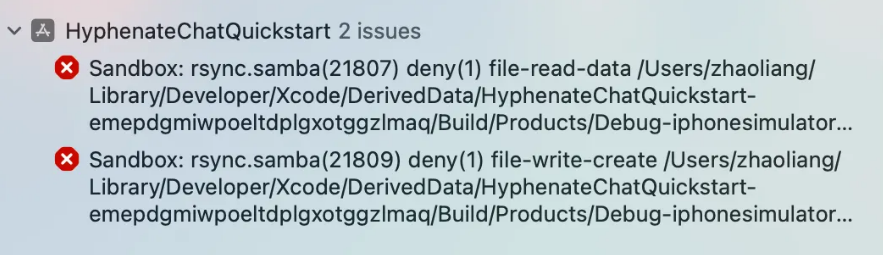
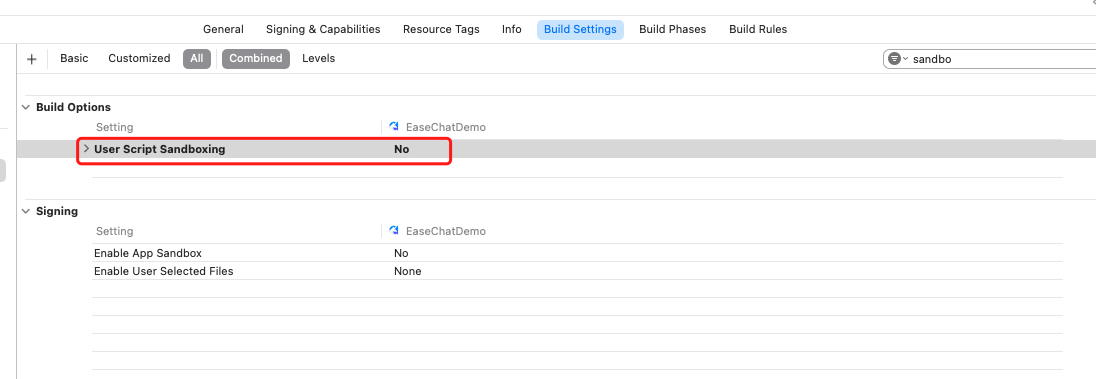
模拟器运行报错
当你使用 Xcode 15 创建新工程时,编译时若出现 Sandbox: rsync.samba(47334) deny(1) file-write-create... 报错,你需要在 Target > Build Settings 中查找 User Script Sandboxing 选项,设置为 NO。