
设置推送通知方式和免打扰模式
设置推送通知方式和免打扰模式
为优化用户在处理大量推送通知时的体验,SDK 在全局和会话层面提供了推送通知方式和免打扰模式的细粒度配置功能。你可以基于推送通知方式、指定免打扰时长或每日时间段,对离线推送进行统一控制。
本文中的全局设置指当前登录用户在 App 内的推送接收规则,不是修改 App Key 下所有用户的配置。调用接口前,需完成 SDK 初始化并成功登录;设备推送配置和 Token 绑定详见 离线推送概述。
开通功能
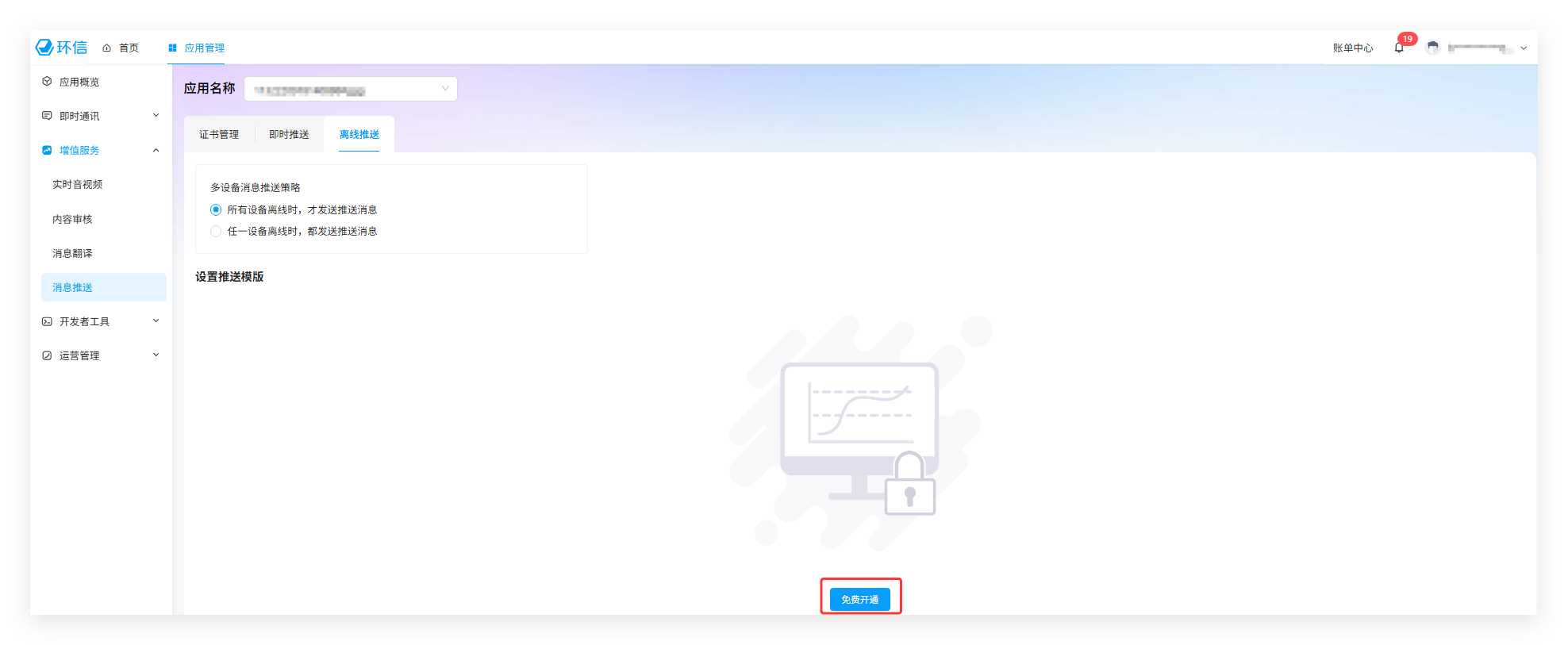
推送通知方式 和 免打扰模式 是推送的高级功能。使用前,你需要在 环信控制台 免费开通。激活后,如需关闭推送高级功能,必须联系商务,因为该操作会删除高级功能相关的所有配置。
- 登录 环信控制台。
- 选择页面上方的 应用管理。在弹出的应用列表页面,单击你的测试版或正式版应用的 App Key。
- 选择 即时通讯 > 推送配置 > 离线推送配置。
- 点击 免费开通。
推送通知方式
推送通知方式 ChatPushRemindType 包含三种类型,如下表所示。该设置适用于 App 全局以及单聊和群聊具体会话。会话级别的推送通知方式设置优先于全局级别设置,未设置推送通知方式的会话默认继承全局设置。
例如,假设全局推送方式设置为 MENTION_ONLY,而指定会话的推送方式设置为 ALL。你会收到来自该会话的所有推送通知,而对于其他会话来说,你只会收到提及你的消息的推送通知。
| 推送通知方式 | 描述 |
|---|---|
ChatPushRemindType.ALL | 接收所有离线消息的推送通知。 |
ChatPushRemindType.MENTION_ONLY | 仅接收提及当前用户的消息推送通知。该参数通常适合群聊场景。若消息需要提及一个或多个用户,可在发消息时通过 ChatMessage.attributes 设置 'em_at_list': <String>['user1', 'user2'];若提及所有人,则设置 'em_at_list': 'all'。Flutter 的 attributes 对应服务端消息 JSON 的 ext,无需再嵌套 ext。 |
ChatPushRemindType.NONE | 不接收离线消息的推送通知。 |
获取所有会话的推送通知方式设置
调用 ChatPushManager.syncConversationsSilentMode 从服务器同步所有会话的推送通知方式设置。同步成功后的结果会存储到原生 SDK 的本地数据库,再通过 ChatConversation.remindType() 查询当前会话的推送通知方式。
Future<void> syncAndReadConversationRemindType(
  String conversationId,
  ChatConversationType conversationType,
) async {
  try {
    // 从服务器同步会话的推送通知方式;等待同步成功后再读取。
    await ChatClient.getInstance.pushManager.syncConversationsSilentMode();

    // 获取指定类型的本地会话;不存在时不自动创建空会话。
    final ChatConversation? conversation =
        await ChatClient.getInstance.chatManager.getConversation(
      conversationId,
      type: conversationType,
      createIfNeed: false,
    );
    if (conversation == null) return;

    // 查询会话当前的推送通知方式,该方法返回 Future<ChatPushRemindType>。
    final ChatPushRemindType remindType = await conversation.remindType();
    debugPrint('Conversation remind type: $remindType');
  } on ChatError catch (error) {
    // 同步或查询失败,根据错误码和错误信息处理。
    debugPrint('Sync/read failed: ${error.code}, ${error.description}');
  }
}
另外,你可以调用 ChatPushManager.setConversationSilentMode,通过 ChatSilentModeParam.remindType 设置指定会话的推送通知方式。详见 设置指定会话的推送接收规则。
清除指定会话的推送通知方式设置
调用 ChatPushManager.removeConversationSilentMode 清除指定会话单独设置的推送通知方式。清除后,该会话继承当前登录用户的全局推送通知方式。当前 Android/iOS 桥接实际调用的是 clearRemindTypeForConversation,因此该接口不是清除所有免打扰规则的通用接口,也不应将其视为取消一次性免打扰时长的接口。
Future<void> clearConversationRemindType(
  String conversationId,
  ChatConversationType conversationType,
) async {
  try {
    // 清除会话单独设置的推送通知方式,恢复继承全局推送通知方式。
    await ChatClient.getInstance.pushManager.removeConversationSilentMode(
      conversationId: conversationId,
      type: conversationType,
    );
    debugPrint('Conversation remind type cleared');
  } on ChatError catch (error) {
    // 清除失败,根据错误码和错误信息处理。
    debugPrint('Clear remind type failed: ${error.code}, ${error.description}');
  }
}
免打扰模式
完成 SDK 初始化并成功登录后,你可以为 App 全局或指定单聊、群聊会话设置免打扰模式。免打扰模式生效期间,环信 IM 不会向对应范围内的离线用户发送推送通知。
Flutter SDK 通过 ChatSilentModeParam 配置免打扰规则,支持以下两种模式,分别对应 ChatSilentModeParamType 中的枚举值:
SILENT_MODE_DURATION(一次性免打扰):通过ChatSilentModeParam.silentDuration设置,立即生效,到期后自动恢复,适用于临时不希望被打扰的场景。SILENT_MODE_INTERVAL(每日循环免打扰):通过ChatSilentModeParam.silentModeInterval设置一个每日循环生效的时间段,例如从23:00到次日07:00,适用于固定的休息时间。
免打扰时间参数的说明如下表所示:
| 规则模式 | 配置方法 | 类型 | 描述 | 生效范围 |
|---|---|---|---|---|
SILENT_MODE_INTERVAL | ChatSilentModeParam.silentModeInterval(startTime: ..., endTime: ...) | ChatSilentModeTime | 每日循环生效的免打扰时段,采用 24 小时制,精确到分钟。startTime 和 endTime 的小时取值范围为 0–23,分钟取值范围为 0–59。- 每日定时触发:设置后,每天在指定时段自动进入免打扰模式。 - 跨天支持:若结束时间早于开始时间,则时段跨天生效。例如,设置为 10:00–08:00,表示当日 10:00 至次日 08:00 免打扰。- 全天与关闭:开始和结束时间相同时,视为全天免打扰;设置为 00:00–00:00 时,关闭每日循环免打扰时段。- 单时段限制:每天仅支持设置一个免打扰时段;新配置会覆盖旧配置。 - 生效时机:设置后立即生效。例如,当日 11:00 设置 08:00–12:00,则当天从 11:00 起生效至 12:00,此后每天按 08:00–12:00 执行。 | 仅 App 全局。 |
SILENT_MODE_DURATION | ChatSilentModeParam.silentDuration(duration) | int | 一次性生效的免打扰持续时长,单位为分钟,应传入整数,取值范围为 0–10080(0 至 7 天)。其中,0 表示该参数无效。- 一次有效:该模式设置后立即开始计时,不会按天重复触发。 - 生效示例:上午 08:00 设置 duration = 240,则当天 08:00–12:00 处于免打扰模式。 | App 全局或指定单聊、群聊会话。 |
表中的 duration 是传给构造方法的分钟数,对应 ChatSilentModeParam.silentDuration 属性;startTime、endTime 需传入 ChatSilentModeTime 对象,而不是时间字符串或整数。Dart 构造方法没有检查上述取值范围,业务侧应传入有效的非空参数,并处理设置失败。
SILENT_MODE_INTERVAL 和 SILENT_MODE_DURATION 同时设置时的叠加规则
- 两者按各自的生效范围和时间 叠加生效,重叠时段不重复计时。
- 自次日起,只有每日循环免打扰时段继续生效;一次性免打扰时长不会重复触发。
示例:上午 08:00 设置每日免打扰时段为 08:00–10:00,同时设置 duration = 240(4 小时):
- 当日:
08:00–12:00免打扰。 - 次日起:每天
08:00–10:00免打扰。
每个 ChatSilentModeParam 实例只指定一种规则模式,字段只读;若需设置多种规则,应分别创建参数并调用设置接口,不能在一个参数对象中同时填写时段和时长。
推送通知方式与免打扰模式的关系
免打扰模式的优先级高于推送通知方式。例如,某个会话的推送通知方式设置为 ALL,但该会话当前命中免打扰时长,或 App 全局当前命中免打扰时段,则免打扰生效期间不会收到该会话的离线推送通知。
如果仅为某个会话设置一次性免打扰,而 App 全局未设置免打扰,则只有该会话在免打扰生效期间不发送离线推送通知;其他会话仍按照各自的推送通知方式或继承的全局设置发送推送通知。会话级别不支持每日循环免打扰时段,不能将全局时段设置直接套用于会话。
提示
若需在免打扰生效期间仍向指定用户发送离线推送通知,可设置 强制推送。
设置全局推送接收规则
调用 ChatPushManager.setSilentModeForAll 设置当前登录用户的全局推送接收规则。通过 ChatSilentModeParam 选择本次要设置的推送通知方式、免打扰时长或每日免打扰时段。该方法返回 Future<void>。
Future<void> setGlobalPushRule() async {
  // 设置推送通知方式为 MENTION_ONLY。
  final ChatSilentModeParam remindParam =
      ChatSilentModeParam.remindType(ChatPushRemindType.MENTION_ONLY);

  // 设置离线推送免打扰时长为 15 分钟。
  final ChatSilentModeParam durationParam =
      ChatSilentModeParam.silentDuration(15);

  // 设置每日免打扰时段为 08:30 至 15:00,仅支持 App 全局。
  final ChatSilentModeParam intervalParam =
      ChatSilentModeParam.silentModeInterval(
    startTime: ChatSilentModeTime(hour: 8, minute: 30),
    endTime: ChatSilentModeTime(hour: 15, minute: 0),
  );

  // 三种参数按需选用一个;本次选择免打扰时长。
  // 如需设置其他规则,改为 remindParam 或 intervalParam。
  final ChatSilentModeParam param = durationParam;

  try {
    // 设置全局推送接收规则;await 正常返回表示设置成功。
    await ChatClient.getInstance.pushManager.setSilentModeForAll(param: param);
    debugPrint('Global push rule updated');
  } on ChatError catch (error) {
    // 设置失败,根据错误码和错误信息处理。
    debugPrint('Set global rule failed: ${error.code}, ${error.description}');
  }
}
获取全局推送接收规则
调用 ChatPushManager.fetchSilentModeForAll 获取当前登录用户的全局推送接收规则。该方法返回 Future<ChatSilentModeResult>,通过 await 获取结果。
Future<void> fetchGlobalPushRule() async {
  try {
    // 从服务器获取当前登录用户的全局推送接收规则。
    final ChatSilentModeResult result =
        await ChatClient.getInstance.pushManager.fetchSilentModeForAll();

    // 获取全局推送通知方式。
    final ChatPushRemindType? remindType = result.remindType;
    // 获取一次性免打扰的到期 Unix 时间戳,不是剩余分钟数。
    final int? expireTimestamp = result.expireTimestamp;

    // 获取每日免打扰时段的开始时间。
    final ChatSilentModeTime? startTime = result.startTime;
    // 获取开始时间的小时数和分钟数。
    final int? startHour = startTime?.hour;
    final int? startMinute = startTime?.minute;

    // 获取每日免打扰时段的结束时间。
    final ChatSilentModeTime? endTime = result.endTime;
    // 获取结束时间的小时数和分钟数。
    final int? endHour = endTime?.hour;
    final int? endMinute = endTime?.minute;

    debugPrint('Global remind type: $remindType, expire: $expireTimestamp');
    debugPrint('Daily interval: $startHour:$startMinute-$endHour:$endMinute');
  } on ChatError catch (error) {
    // 服务端查询失败,根据错误码和错误信息处理。
    debugPrint('Fetch global rule failed: ${error.code}, ${error.description}');
  } catch (error) {
    // 当前模型解析还可能抛出非 ChatError 异常,见下方说明。
    debugPrint('Fetch/parse global rule failed: $error');
  }
}
注意
当前 ChatSilentModeResult 的 remindType、startTime、endTime 等公开字段虽声明为可空,但 fromJson 仍直接读取并解析 startTime、endTime、remindType、convId、conversationType 等字段。原生返回数据缺少这些字段时,可能在 Dart 解析阶段抛出 TypeError 等非 ChatError 异常。Android 桥接会省略值为空的会话、时段或通知方式字段;iOS 返回数据也可能缺少空的会话 ID 或时段字段。
该限制同样适用于下方单个和批量会话查询,不能仅靠返回对象的可空声明认为所有缺失字段都能安全解析。集成时需确认所用 SDK 的解析实现,并处理异常;解析失败不代表服务端没有配置规则或设置操作失败。
设置指定会话的推送接收规则
调用 ChatPushManager.setConversationSilentMode 设置指定单聊或群聊会话的推送接收规则。通过 ChatSilentModeParam 选择推送通知方式或一次性免打扰时长。目前不支持设置会话的每日免打扰时段。
Future<void> setConversationPushRule(
  String conversationId,
  ChatConversationType conversationType,
) async {
  // 设置推送通知方式为 MENTION_ONLY。
  final ChatSilentModeParam remindParam =
      ChatSilentModeParam.remindType(ChatPushRemindType.MENTION_ONLY);

  // 设置一次性离线推送免打扰时长为 15 分钟。
  final ChatSilentModeParam durationParam =
      ChatSilentModeParam.silentDuration(15);

  // 两种参数按需选用一个;如需设置推送通知方式,改为 remindParam。
  final ChatSilentModeParam param = durationParam;

  try {
    // 设置指定会话的规则;type 为 ChatConversationType,不是 ChatType。
    await ChatClient.getInstance.pushManager.setConversationSilentMode(
      conversationId: conversationId,
      type: conversationType,
      param: param,
    );
    // 返回类型为 Future<void>,不返回规则对象。
    debugPrint('Conversation push rule updated');
  } on ChatError catch (error) {
    // 设置失败,根据错误码和错误信息处理。
    debugPrint('Set conversation rule failed: '
        '${error.code}, ${error.description}');
  }
}
获取指定会话的推送接收规则
调用 ChatPushManager.fetchConversationSilentMode 获取指定会话的推送接收规则,返回 Future<ChatSilentModeResult>。
Flutter 的 ChatSilentModeResult 没有 Android 的 isConversationRemindTypeEnabled() 对应接口,当前双端桥接也未透传该标记。不能凭 result.remindType 是否非空判断会话是否单独设置了推送通知方式,也不能用它区分显式设置与继承全局设置。
Future<void> fetchConversationPushRule(
  String conversationId,
  ChatConversationType conversationType,
) async {
  try {
    // 从服务器获取指定会话的推送接收规则。
    final ChatSilentModeResult result =
        await ChatClient.getInstance.pushManager.fetchConversationSilentMode(
      conversationId: conversationId,
      type: conversationType,
    );

    // 获取返回的推送通知方式;不能据此判断是否为会话单独设置的值。
    final ChatPushRemindType? remindType = result.remindType;
    // 获取该会话一次性免打扰的到期 Unix 时间戳。
    final int? expireTimestamp = result.expireTimestamp;
    debugPrint('Conversation remind type: $remindType');
    debugPrint('Conversation DND expire: $expireTimestamp');
  } on ChatError catch (error) {
    // 服务端查询失败,根据错误码和错误信息处理。
    debugPrint('Fetch conversation rule failed: '
        '${error.code}, ${error.description}');
  } catch (error) {
    // 处理当前模型在返回字段缺失时可能产生的解析异常。
    debugPrint('Fetch/parse conversation rule failed: $error');
  }
}
批量获取会话的推送接收规则
- 每次调用最多获取 20 个会话的设置。
- 如果会话继承了全局设置或其推送通知设置已过期,则返回的字典不包含此会话。不要把返回字典缺少某个会话解释为该会话一定处于免打扰状态。
调用 ChatPushManager.fetchSilentModeForConversations 获取多个会话的推送接收规则。参数为 List<ChatConversation>,不是会话 ID 字符串列表;返回 Future<Map<String, ChatSilentModeResult>>,Map 的键为会话 ID,值为该会话的规则对象。输入列表中的会话 ID 不应重复。
Future<void> fetchConversationPushRules(
  List<ChatConversation> conversationList,
) async {
  // 业务侧检查单次批量查询数量,并提前准备已有的单聊或群聊会话对象。
  if (conversationList.isEmpty || conversationList.length > 20) {
    throw ArgumentError('conversationList must contain 1 to 20 conversations');
  }

  try {
    // 批量从服务器获取规则;按返回 Map 的会话 ID 匹配本地会话。
    final Map<String, ChatSilentModeResult> results = await ChatClient
        .getInstance.pushManager
        .fetchSilentModeForConversations(conversationList);
    for (final entry in results.entries) {
      // 获取本条结果对应的会话 ID。
      final String conversationId = entry.key;
      // 获取该会话的推送接收规则。
      final ChatSilentModeResult rule = entry.value;
      debugPrint('$conversationId: ${rule.remindType}, ${rule.expireTimestamp}');
    }
  } on ChatError catch (error) {
    // 服务端查询失败,根据错误码和错误信息处理。
    debugPrint('Fetch rules failed: ${error.code}, ${error.description}');
  } catch (error) {
    // 任一结果解析失败时,此调用可能无法返回完整 Map。
    debugPrint('Fetch/parse rules failed: $error');
  }
}
接口列表
| API 名称 | 所属模块/类 | 说明 |
|---|---|---|
syncConversationsSilentMode | ChatPushManager | 异步同步服务端保存的会话推送通知方式,返回 Future<void>。 |
setConversationSilentMode | ChatPushManager | 设置指定会话的推送通知方式或一次性免打扰时长,返回 Future<void>。 |
fetchConversationSilentMode | ChatPushManager | 获取指定会话的推送接收规则,返回 Future<ChatSilentModeResult>。 |
setSilentModeForAll | ChatPushManager | 设置当前登录用户的全局推送接收规则,返回 Future<void>。 |
fetchSilentModeForAll | ChatPushManager | 获取全局推送接收规则,返回 Future<ChatSilentModeResult>。 |
fetchSilentModeForConversations | ChatPushManager | 批量获取最多 20 个会话的推送接收规则,返回 Future<Map<String, ChatSilentModeResult>>。 |
removeConversationSilentMode | ChatPushManager | 清除会话单独设置的推送通知方式,恢复继承全局推送通知方式。 |