
消息列表的基本设置
消息列表的基本设置
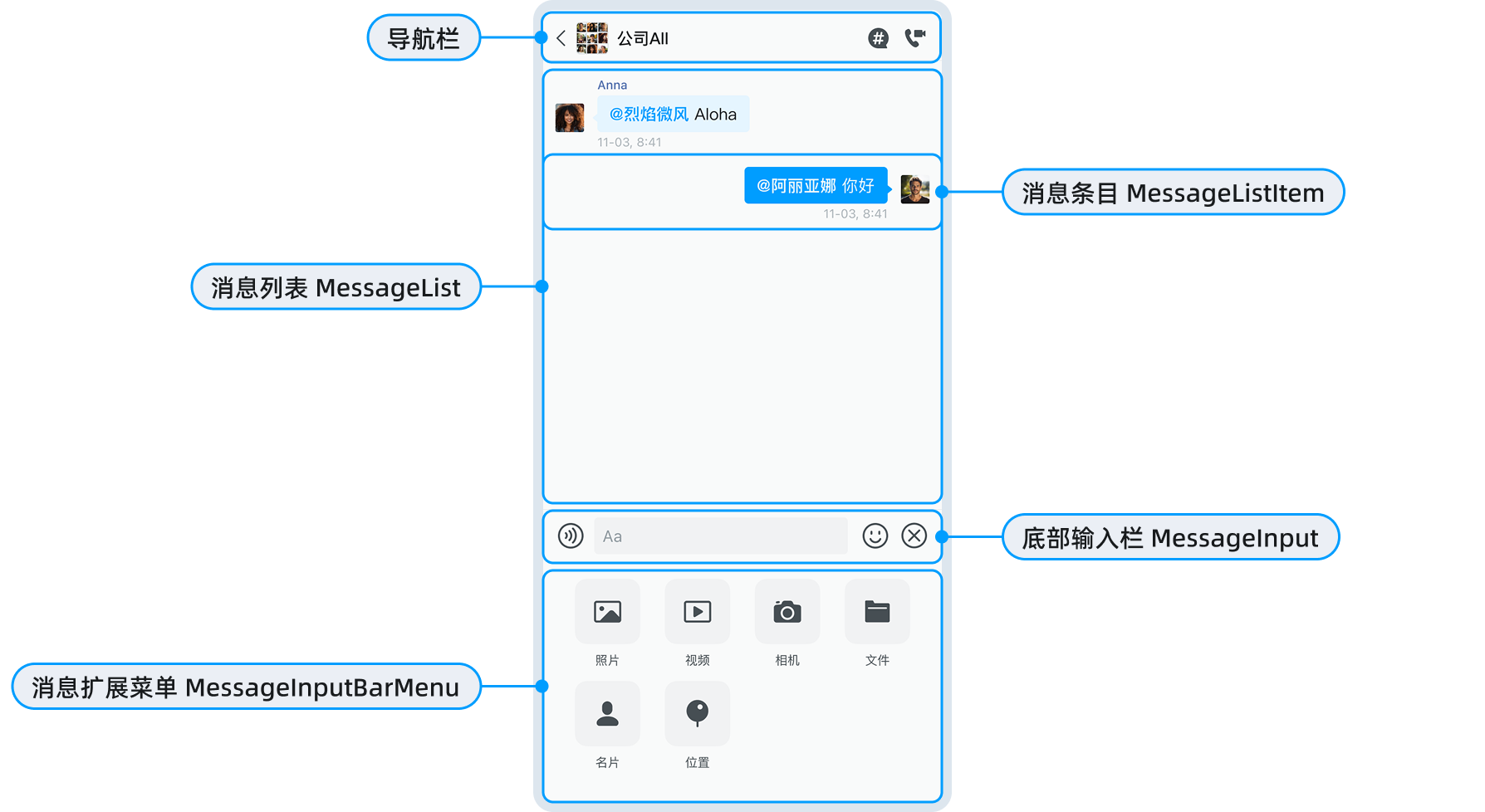
MessageList 组件负责消息的展示与管理,支持消息发送、编辑、删除及自定义交互:
- 消息展示:文本、图片、语音、视频、文件、名片等类型。
- 消息状态:发送中、已发送、已读、失败等状态实时更新。
- 消息操作:复制、引用、撤回、编辑、删除、重发。
- 附件管理:图片预览、语音播放、视频播放、文件下载。
- 菜单扩展:支持添加或修改长按菜单项。
- 样式定制:支持自定义消息气泡、头像、时间等样式。
概述
消息列表组件 MessageList 支持设置基本属性,如下表所示:
| 属性 | 类型 | 是否必需 | 描述 |
|---|---|---|---|
type | ConversationDetailModelType | 是 | 消息列表的类型。 - chat:普通聊天页面。- create_thread:创建话题页面。- thread:话题聊天页面。- search:搜索消息页面。 |
convId | string | 是 | 会话 ID。 |
convType | ChatConversationType | 是 | 会话类型。 |
containerStyle | StyleProp<ViewStyle> | 否 | 消息列表容器的样式。详见 设置容器样式。 |
onClickedItem | (id, model) => void | boolean | 否 | 点击消息回调。返回 false 可阻止默认行为。详见 点击消息条目。 |
onLongPressItem | (id, model) => void | boolean | 否 | 长按消息回调。返回 false 可阻止默认行为。详见 长按消息条目。 |
onClickedItemAvatar | (id, model) => void | boolean | 否 | 点击头像的回调。返回 false 可阻止默认行为。详见 点击消息头像。 |
onClickedItemQuote | (id, model) => void | boolean | 否 | 点击引用消息的回调。返回 false 可阻止默认行为。详见 点击引用消息。 |
recvMessageAutoScroll | boolean | 否 | 收到新消息时是否自动滚动到底部。 - true:自动滚动。- false(默认):不自动滚动。详见 自动滚动设置。 |
messageLayoutType | MessageLayoutType | 否 | 消息布局类型。 - left:全部消息都在左侧。- right:全部消息都在右侧。- 不设置(默认):发送的消息在右侧,接收的消息在左侧。 详见 消息布局类型。 |
reportMessageCustomList | {key: string, value: string}[] | 否 | 自定义消息举报内容列表。详见 自定义消息上报。 |
listItemRenderProps | MessageListItemRenders & {ListItemRender} | 否 | 自定义消息条目渲染组件。 |
onInitMenu | (initItems) => InitMenuItemsType[] | 否 | 初始化长按菜单回调,可以添加、修改或删除菜单项。 |
onCopyFinished | (content: string) => void | 否 | 复制完成回调。 |
onNoMoreMessage | () => void | 否 | 无更多历史消息回调。 |
onCreateThread | (params) => void | 否 | 请求创建话题时的回调。 |
onOpenThread | (thread) => void | 否 | 打开话题时的回调。 |
onCreateThreadResult | (thread?, firstMessage?) => void | 否 | 创建话题结果的回调。 |
onClickedEditThreadName | (thread) => void | 否 | 点击编辑话题名称时的回调(话题模式下)。 |
onClickedOpenThreadMemberList | (thread) => void | 否 | 点击打开话题成员列表时的回调(话题模式下)。 |
onClickedLeaveThread | (threadId) => void | 否 | 点击离开话题时的回调(话题模式下)。 |
onClickedDestroyThread | (threadId) => void | 否 | 点击销毁话题时的回调(话题模式下)。 |
onClickedHistoryDetail | (item) => void | 否 | 点击历史消息详情时的回调。 |
generateThreadName | (msg: MessageModel) => string | 否 | 生成话题名称的回调函数。 |
MessageCustomLongPressMenu | React.ForwardRefExoticComponent<...> | 否 | 自定义消息长按菜单组件。 |
thread | ChatMessageThread | 否 | 话题对象(话题模式下需要)。 |
msgId | string | 否 | 消息 ID(创建话题模式下需要)。 |
parentId | string | 否 | 父级 ID(创建话题模式下需要)。 |
newThreadName | string | 否 | 新话题名称(创建话题模式下需要)。 |
firstMessage | SendMessageProps | 否 | 第一条消息(话题模式下需要)。 |
提示
表格中未列出的一些属性(如 onClicked、onQuoteMessageForInput、onEditMessageForInput、onClickedMultiSelected、onChangeMultiItems、onClickedSingleSelect、onChangeUnreadCount、onChangePinMaskHeight、onRequestClosePinMessage 等)主要用于内部组件之间通信,一般用户无需关注。
对象引用的方法如下表所示:
| 方法 | 描述 |
|---|---|
addSendMessage | 发送消息。 |
addSendMessageToUI | 仅添加到 UI,不发送服务器。 |
sendMessageToServer | 发送消息到服务器。 |
removeMessage | 移除消息。 |
recallMessage | 撤回消息。 |
updateMessage | 更新消息。 |
loadHistoryMessage | 加载历史消息。 |
onInputHeightChange | 输入组件的高度变化。 |
editMessageFinished | 编辑消息完成。 |
scrollToBottom | 滚动到底部。 |
startShowThreadMoreMenu | 显示底部话题菜单。 |
cancelMultiSelected | 取消多选。 |
removeMultiSelected | 移除已选的消息。 |
getMultiSelectedMessages | 获取已选消息列表。 |
设置消息列表的背景色
type Props = NativeStackScreenProps<RootScreenParamsList>;
export function ConversationDetailScreen(props: Props) {
  const { route } = props;
  const convId = ((route.params as any)?.params as any)?.convId;
  const convType = ((route.params as any)?.params as any)?.convType;

  return (
    <ConversationDetail
      type={'chat'}
      convId={convId}
      convType={convType}
      list={{
        props: {
          containerStyle: { backgroundColor: 'red' },
        },
      }}
    />
  );
}
设置消息列表的背景图片
type Props = NativeStackScreenProps<RootScreenParamsList>;
export function ConversationDetailScreen(props: Props) {
  const { route } = props;
  const convId = ((route.params as any)?.params as any)?.convId;
  const convType = ((route.params as any)?.params as any)?.convType;

  return (
    <ConversationDetail
      type={'chat'}
      convId={convId}
      convType={convType}
      list={{
        props: {
          backgroundImage: 'https://img.yzcdn.cn/vant/cat.jpeg',
        },
      }}
    />
  );
}
设置消息条目
消息条目的界面效果如下图所示:

设置头像和昵称
MessageList 组件 不内置默认头像和昵称,需通过用户信息提供机制进行配置:
- 未配置时:头像显示默认占位图,昵称显示用户 ID。
- 配置方式:通过
UIKitContainer的userInfoProvider属性提供用户信息。详见 用户自定义信息文档。
隐藏左侧消息头像:
export function MyMessageView(props: MessageViewProps) {
  if (props.model.layoutType === 'left') {
    // todo: 如果是左边的消息,则不显示头像
    return <MessageView {...props} avatarIsVisible={false} />;
  }
  return MessageView(props);
}

type Props = NativeStackScreenProps<RootScreenParamsList>;
export function ConversationDetailScreen(props: Props) {
  const { route } = props;
  const convId = ((route.params as any)?.params as any)?.convId;
  const convType = ((route.params as any)?.params as any)?.convType;

  return (
    <ConversationDetail
      type={'chat'}
      convId={convId}
      convType={convType}
      list={{
        props: {
          listItemRenderProps: {
            MessageView: MyMessageView,
          },
        },
      }}
    />
  );
}
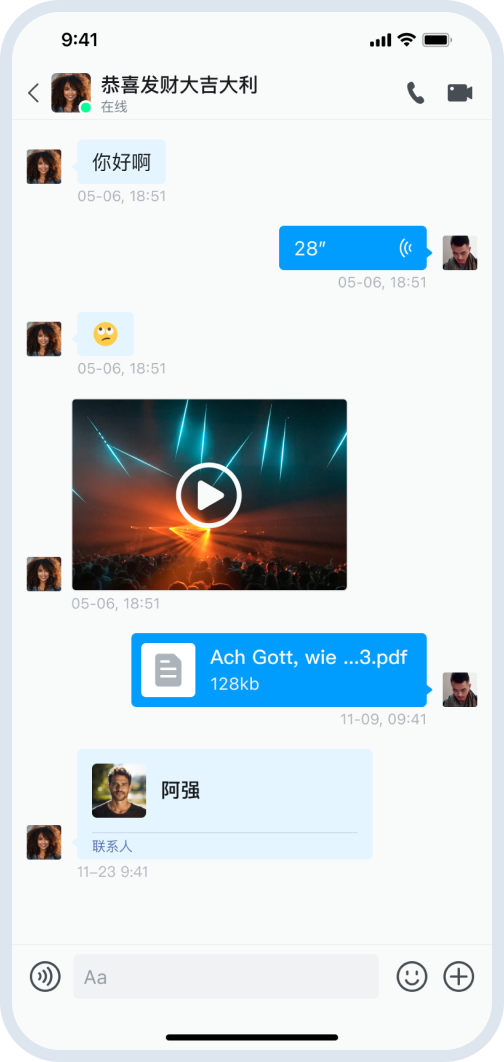
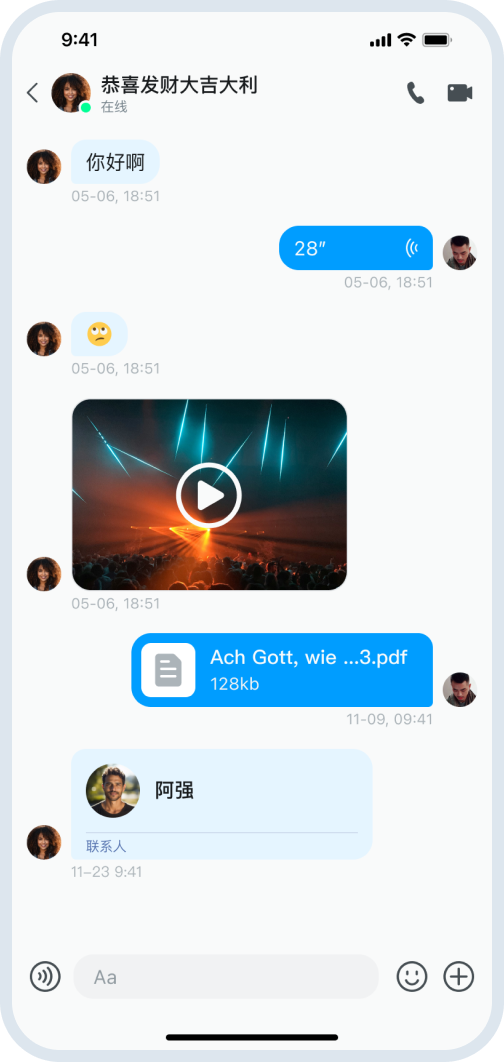
设置消息气泡
MessageBubble 为消息气泡组件,支持自定义气泡的颜色、圆角、阴影等样式。

import React from 'react';
import { View } from 'react-native';
import { MessageBubble, MessageBubbleProps } from 'react-native-chat-uikit';

export function CustomMessageBubble(props: MessageBubbleProps) {
  const { model, children } = props;

  // 自定义发送消息的气泡样式
  if (model.layoutType === 'right') {
    return (
      <View
        style={{
          backgroundColor: '#4CAF50', // 自定义背景色
          borderRadius: 16,
          padding: 12,
          shadowColor: '#000',
          shadowOffset: { width: 0, height: 2 },
          shadowOpacity: 0.1,
          shadowRadius: 4,
          elevation: 2,
        }}
      >
        {children}
      </View>
    );
  }

  // 接收消息使用默认样式
  return <MessageBubble {...props} />;
}
设置消息时间
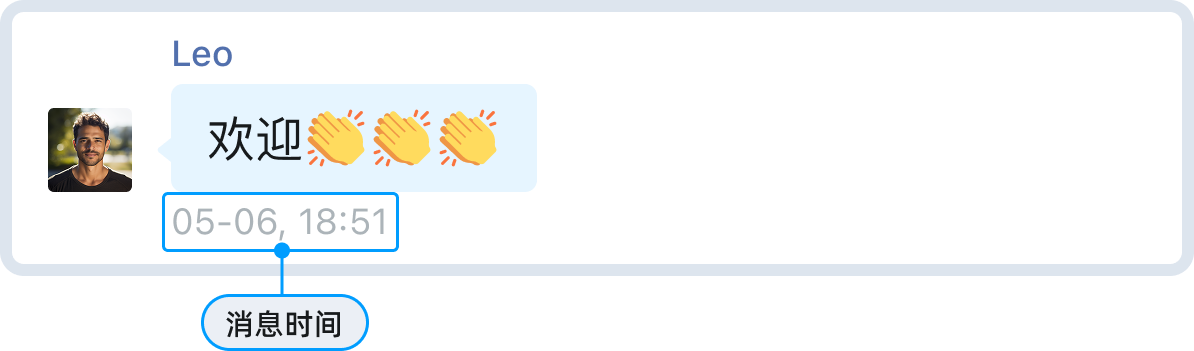
初始化时,可设置消息时间格式。
export function App() {
  const { getOptions } = useApp();

  return (
    <UIKitContainer
      options={getOptions()}
      formatTime={{
        locale: enAU,
        conversationDetailCallback(timestamp, enAU) {
          // 你也可以设置当天、其他日期、其他年份时间格式
          return format(timestamp, 'yyyy-MM-dd HH:mm:ss', { locale: enAU });
        },
      }}
    >
      {/* sub component */}
    </UIKitContainer>
  );
}
设置长按消息菜单
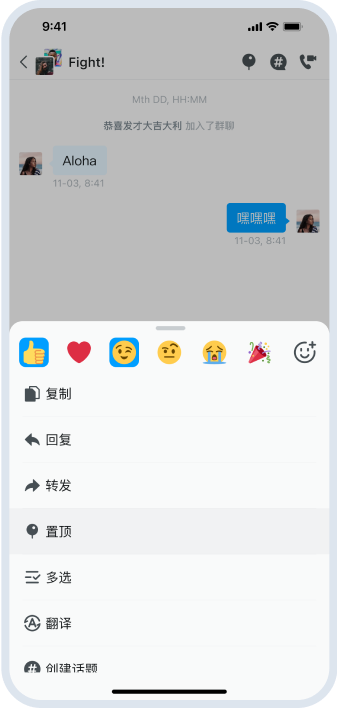
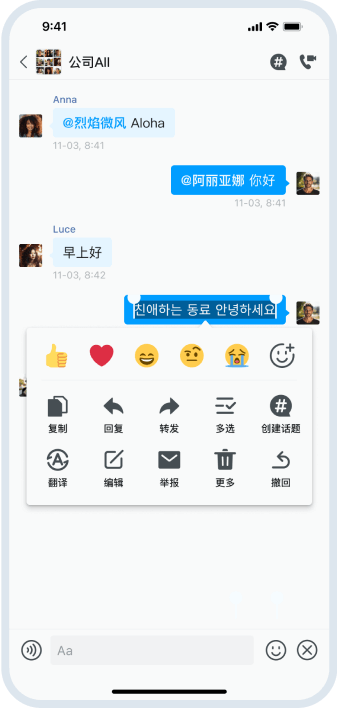
在消息列表中长按任意消息,即可弹出操作菜单,支持复制、回复、转发、置顶、多选、翻译、创建话题等丰富功能。
UIKit 提供三种消息长按菜单风格。你可以通过 UIKitContainer 的 messageMenuStyle 属性进行全局配置:
| 菜单风格值 | 描述 |
|---|---|
bottom-sheet | (默认)底部弹出菜单:菜单从页面底部弹出。 |
context | 类似微信风格菜单:菜单在长按位置附近弹出。 |
custom | 自定义菜单:通过用户自定义组件实现,需要遵守 MessageCustomLongPressMenu 约束。 |
- (默认)使用底部弹出菜单风格:
<UIKitContainer
  options={options}
  messageMenuStyle="bottom-sheet"
>
  {/* 应用内容 */}
</UIKitContainer>
- 使用类似微信风格菜单:
<UIKitContainer
  options={options}
  messageMenuStyle="context"
>
  {/* 应用内容 */}
</UIKitContainer>
- 使用自定义菜单组件:
如果需要完全自定义菜单样式,可以设置 messageMenuStyle="custom",并通过 MessageCustomLongPressMenu 属性提供自定义菜单组件。
提示
建议使用默认的 bottom-sheet 或 context 风格,只有在需要完全自定义菜单 UI 时才使用 custom 样式。
- 在全局设置属性
Container.messageMenuStyle为custom。其他模式不需要用户设置MessageCustomLongPressMenu。
export function App() {
  return (
    <UIKitContainer messageMenuStyle={'custom'}>
      {/* sub component */}
    </UIKitContainer>
  );
}
- 在
ConversationDetail组件中设置属性MessageCustomLongPressMenu。
export const MyMessageContextNameMenu = React.forwardRef<
  ContextNameMenuRef,
  ContextNameMenuProps
>(function (
  props: ContextNameMenuProps,
  ref?: React.ForwardedRef<ContextNameMenuRef>
) {
  const {} = props;
  React.useImperativeHandle(
    ref,
    () => {
      return {
        startShow: () => {},
        startHide: (_onFinished?: () => void) => {},
        startShowWithInit: (_initItems: InitMenuItemsType[], _?: any) => {},
        startShowWithProps: (_props: ContextNameMenuProps) => {},
        getData: () => {
          return undefined;
        },
      };
    },
    []
  );
  ref;
  return <View style={{ width: 100, height: 44, backgroundColor: 'red' }} />;
});

type Props = NativeStackScreenProps<RootScreenParamsList>;
export function MyConversationDetailScreen(props: Props) {
  const { route } = props;

  return (
    <SafeAreaViewFragment>
      <ConversationDetail
        MessageCustomLongPressMenu={MyMessageContextNameMenu}
      />
    </SafeAreaViewFragment>
  );
}
关于菜单项的添加、删除、显示/隐藏以及样式的设置,详见 消息列表的高级设置说明。
设置点击事件
点击消息
通过 onClickedItem 处理消息点击事件:
<ConversationDetail
  type="chat"
  convId={convId}
  convType={convType}
  list={{
    props: {
      onClickedItem: (id, model) => {
        console.log('点击消息:', id);
        console.log('消息模型:', model);

        // 根据消息类型执行不同操作
        if (model.modelType === 'message') {
          const messageModel = model as MessageModel;
          if (messageModel.msg.body.type === ChatMessageType.IMAGE) {
            // 预览图片(默认行为已实现)
            console.log('预览图片');
          } else if (messageModel.msg.body.type === ChatMessageType.VIDEO) {
            // 播放视频(默认行为已实现)
            console.log('播放视频');
          }
        }

        // 返回 false 可阻止默认行为
        // return false;
      },
    },
  }}
  onBack={() => navigation.goBack()}
/>
长按消息
通过 onLongPressItem 处理消息长按事件:
<ConversationDetail
  type="chat"
  convId={convId}
  convType={convType}
  list={{
    props: {
      onLongPressItem: (id, model) => {
        console.log('长按消息:', id, model);

        // 默认会弹出消息上下文菜单
        // 返回 false 可阻止默认菜单弹出
        // return false;
      },
    },
  }}
  onBack={() => navigation.goBack()}
/>
点击头像
通过 onClickedAvatar 处理标题栏头像的点击事件。参数说明如下:
convId: 会话 ID。convType: 会话类型。ownerId: 所有者 ID。单聊为消息发送方和接收方的用户 ID,群聊为消息发送方的用户 ID。
<ConversationDetail
  type="chat"
  convId={convId}
  convType={convType}
  onClickedAvatar={(params) => {
    const { convId, convType, ownerId } = params;
    console.log('点击头像:', convId, convType, ownerId);

    // 跳转到用户详情或群组详情页面
    if (convType === ChatConversationType.PeerChat) {
      navigation.navigate('UserDetail', { userId: convId });
    } else {
      navigation.navigate('GroupDetail', { groupId: convId });
    }
  }}
  onBack={() => navigation.goBack()}
/>
点击话题
通过 onClickedThread 处理话题按钮的点击事件(仅群聊有效):
<ConversationDetail
  type="chat"
  convId={convId}
  convType={convType}
  onClickedThread={() => {
    console.log('点击话题按钮');
    // 跳转到话题列表页面
    navigation.navigate('ThreadList', { groupId: convId });
  }}
  onBack={() => navigation.goBack()}
/>
点击音视频通话
通过 onClickedVoice 和 onClickedVideo 处理音视频通话按钮的点击事件:
<ConversationDetail
  type="chat"
  convId={convId}
  convType={convType}
  onClickedVoice={() => {
    console.log('发起语音通话');
    // 调用语音通话功能
    startVoiceCall(convId);
  }}
  onClickedVideo={() => {
    console.log('发起视频通话');
    // 调用视频通话功能
    startVideoCall(convId);
  }}
  onBack={() => navigation.goBack()}
/>
点击引用消息
通过 onClickedItemQuote 处理引用消息的点击事件:
<ConversationDetail
  type="chat"
  convId={convId}
  convType={convType}
  list={{
    props: {
      onClickedItemQuote: (id, model) => {
        console.log('点击引用消息:', id, model);

        // 默认会滚动到被引用的消息
        // 返回 false 可阻止默认行为
        // return false;
      },
    },
  }}
  onBack={() => navigation.goBack()}
/>
完整实例
自定义消息条目和自定义消息长按菜单的示例如下:
export function MyMessageContent(props: MessageContentProps) {
  const { msg } = props;
  if (msg.body.type === ChatMessageType.CUSTOM) {
    return (
      <View>
        <Text>{(msg.body as ChatCustomMessageBody).params?.test}</Text>
      </View>
    );
  }
  return <MessageContent {...props} />;
}
type Props = NativeStackScreenProps<RootScreenParamsList>;
export function ConversationDetailScreen(props: Props) {
  const { navigation, route } = props;
  const convId = ((route.params as any)?.params as any)?.convId;
  const convType = ((route.params as any)?.params as any)?.convType;
  const listRef = React.useRef<MessageListRef>({} as any);
  const inputRef = React.useRef<MessageInputRef>({} as any);
  const { top, bottom } = useSafeAreaInsets();
  const im = useChatContext();

  return (
    <SafeAreaView
      style={{
        flex: 1,
      }}
    >
      <ConversationDetail
        type={"chat"}
        convId={convId}
        convType={convType}
        input={{
          ref: inputRef,
          props: {
            top,
            bottom,
            onInitMenu: (menu) => {
              return [
                ...menu,
                {
                  name: "test",
                  isHigh: false,
                  icon: "bell",
                  onClicked: () => {
                    listRef.current?.addSendMessage({
                      type: "custom",
                      msg: ChatMessage.createCustomMessage(convId, "test", 1, {
                        params: { test: "111" },
                      }),
                    });
                  },
                },
              ];
            },
          },
        }}
        list={{
          ref: listRef,
          props: {
            listItemRenderProps: {
              MessageContent: MyMessageContent,
            },
          },
        }}
      />
    </SafeAreaView>
  );
}