
聊天页面介绍
大约 2 分钟
UIKit-Flutter 集成文档
聊天页面介绍
环信单群聊 UIKit 提供 MessagesView Widget 方便用户快速集成聊天页面和自定义聊天页面。
页面功能
聊天页面提供如下功能:
| 功能 | 描述 |
|---|---|
| 消息收发 | 收发文本、表情、图片、语音、视频、文件、名片等消息。 |
| 消息操作 | 复制、引用、撤回、删除、编辑、重发、举报。 |
| 消息管理 | 本地消息清除、消息搜索、消息多选。 |
| 互动增强 | 表情回应、消息置顶、消息翻译、转发。 |
页面组件
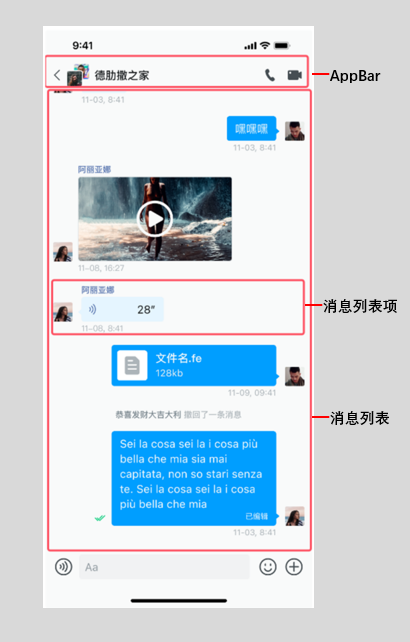
聊天页面通过 MessagesView 实现,由标题栏(AppBar)、消息列表和消息输入区组成。
聊天页面 MessageView
标题栏
聊天页面与会话列表页面、通讯录页面、群详情页面和好友详情页面的标题栏均使用 ChatUIKitAppBar。详见 设置标题栏。
消息列表
消息列表 MessageListView 用于展示发送和接收的消息,以及对消息进行操作:
- 发送和接收消息:包括文本、表情、图片、语音、视频、文件和名片等消息。
- 消息操作:对消息进行复制、引用、撤回、删除、编辑、重新发送、举报、翻译、转发、多选、置顶操作。
消息条目 ChatUIKitMessageListViewMessageItem 实现单条消息展示,包括展示消息内容的消息气泡、对端用户头像或群头像、消息时间等。
消息输入区
消息输入区 ChatUIKitInputBar 实现各类消息的输入和发送以及表情等功能,包括两部分:
- 消息输入栏
ChatUIKitInputBar:输入和发送文本和语音消息、添加表情以及扩展功能等。 - 消息扩展菜单
ChatUIKitMorePanel:发送附件类型消息,例如,图片、视频、文件以及自定义类型消息(如名片消息)等。
创建聊天页面
你可通过以下两种方式创建聊天页面:
- 使用 UIKit 提供的
MessagesView:
import 'package:em_chat_uikit/chat_uikit.dart';
class ChatPage extends StatelessWidget {
final String conversationId;
final ChatType chatType; // 单聊和群聊分别为 ChatType.Chat 和 ChatType.GroupChat
const ChatPage({
super.key,
required this.conversationId,
required this.chatType,
});
Widget build(BuildContext context) {
// 创建用户资料对象
ChatUIKitProfile profile = ChatUIKitProfile(
id: conversationId,
type: chatType == ChatType.Chat
? ChatUIKitProfileType.user
: ChatUIKitProfileType.group,
);
return MessagesView(
profile: profile,
enableAppBar: true,
appBarModel: ChatUIKitAppBarModel(
title: '聊天',
showBackButton: true,
onBackButtonPressed: () {
Navigator.of(context).pop();
},
),
);
}
}
- 使用
MessagesView.arguments构造函数:
MessagesView.arguments(
  MessagesViewArguments(
    profile: ChatUIKitProfile(
      id: conversationId,
      type: chatType == ChatType.Chat
          ? ChatUIKitProfileType.user
          : ChatUIKitProfileType.group,
    ),
    enableAppBar: true,
    appBarModel: ChatUIKitAppBarModel(
      title: '聊天',
      showBackButton: true,
    ),
  ),
)
导航到聊天页面
Navigator.of(context).push(
  MaterialPageRoute(
    builder: (context) => ChatPage(
      conversationId: 'user_id_or_group_id',
      chatType: ChatType.Chat, // 或 ChatType.GroupChat
    ),
  ),
);